
Temporary Tables in Db2 for i – Efficient, Flexible, but Plan Carefully
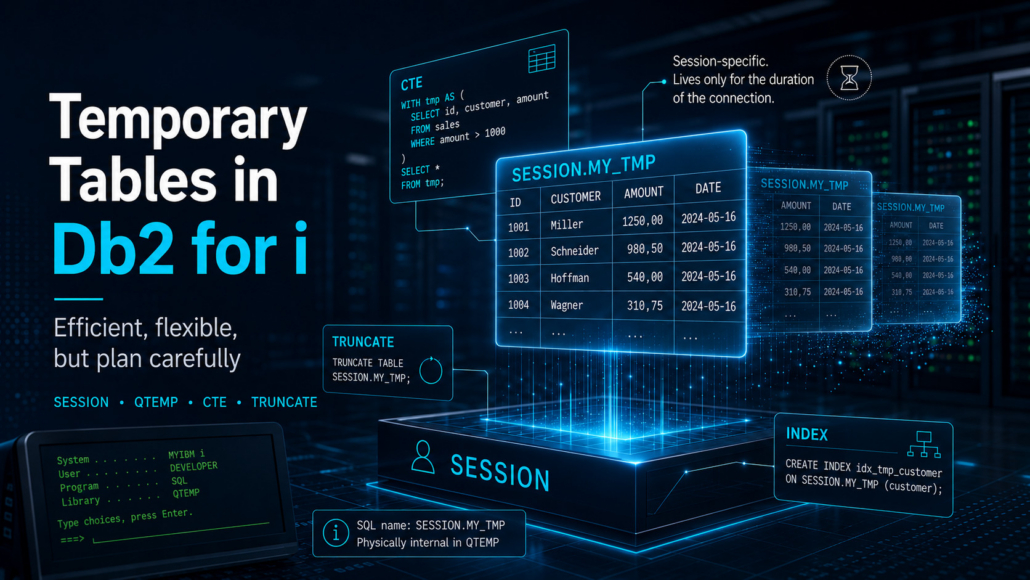
Declared Global Temporary Tables, CTEs, QTEMP, TRUNCATE, and Indexes – What Really Matters on IBM i
What Are Temporary Tables?
On IBM i you work with DECLARE GLOBAL TEMPORARY TABLE (abbreviated DGTT). The table is not persistent, does not appear in the regular system catalog, and cannot be shared across application contexts. Each connection or relevant job context receives its own instance.
Technical Foundation
The table name must be qualified with the SESSION schema. Db2 for i creates the object internally in QTEMP. In SQL, however, you normally reference the table as SESSION.YOUR_NAME.
DECLARE GLOBAL TEMPORARY TABLE SESSION.TEMP_EMP (
    EMPNO CHAR(6) NOT NULL,
    SALARY DECIMAL(10, 2),
    DEPTNO CHAR(3)
)
WITH REPLACE
ON COMMIT PRESERVE ROWS
NOT LOGGED;
WITH REPLACE replaces any existing temporary table with the same name in the current application context and deletes its previous rows. ON COMMIT PRESERVE ROWS keeps the rows after a commit. Without this clause the default ON COMMIT DELETE ROWS applies – rows may disappear on commit unless a dependent WITH HOLD cursor remains open. NOT LOGGED reduces logging overhead, but changes to this table are not rolled back like normal table changes.
DGTT on IBM i: SESSION and QTEMP
A common misconception: because the table physically lands in QTEMP, developers sometimes declare it that way. That is not the correct approach for DECLARE GLOBAL TEMPORARY TABLE on IBM i. The qualifier must be SESSION. If you omit the qualifier, Db2 for i implicitly uses SESSION.
DECLARE GLOBAL TEMPORARY TABLE QTEMP.MY_TEMP ... is incorrect for a DGTT. If you supply a qualifier it must be SESSION. You can also omit the qualifier entirely; Db2 for i will then assume SESSION implicitly.Name Resolution
When a DGTT exists, SESSION.TEMP_EMP resolves to that temporary table. If it does not exist in the current context, Db2 for i does not treat the name as a DGTT reference and may resolve it as a permanent table in the SESSION schema. In stored procedures and RPG programs it is therefore safer to declare the temporary table explicitly before you use it.
Optional: FOR SYSTEM NAME
When you work with long SQL names you can optionally assign an IBM i system name. This name is limited to ten characters and can be useful in very low-level scenarios. For normal SQL usage the option is rarely needed.
DECLARE GLOBAL TEMPORARY TABLE SESSION.TEMP_EMPLOYEE_REPORT (
    EMPNO CHAR(6),
    DEPTNO CHAR(3),
    TOTAL_SALARY DECIMAL(15,2)
)
FOR SYSTEM NAME TEMPEMP01
WITH REPLACE
ON COMMIT PRESERVE ROWS
NOT LOGGED;
SQL Examples to Replicate
1. Derive Structure from an Existing Table
You can derive the structure of a DGTT from a query or adopt it directly from an existing table:
-- Variant A: Using SELECT
DECLARE GLOBAL TEMPORARY TABLE SESSION.TEMP_EMP AS (
  SELECT EMPNO, SALARY, DEPTNO
  FROM MYLIB.EMPLOYEES
)
WITH NO DATA
ON COMMIT PRESERVE ROWS
NOT LOGGED;

-- Variant B: Using LIKE (very clean)
DECLARE GLOBAL TEMPORARY TABLE SESSION.TEMP_EMP
LIKE MYLIB.EMPLOYEES
WITH REPLACE
ON COMMIT PRESERVE ROWS
NOT LOGGED;
2. CTE for a One-Time Intermediate Result
If you need an intermediate result only inside a single SQL statement, a CTE is often more elegant:
WITH TempSales AS (
  SELECT ORDERID, SUM(AMOUNT) AS TOTAL
  FROM MYLIB.SALES
  GROUP BY ORDERID
)
SELECT *
FROM TempSales
WHERE TOTAL > 1000;
3. Combining CTE and Temporary Table
For multi-stage processing a DGTT is often useful: populate once, evaluate multiple times, and optionally create indexes.
DECLARE GLOBAL TEMPORARY TABLE SESSION.TEMP_AVGSAL (
  DEPTNO CHAR(3),
  AVG_SAL DECIMAL(11,2)
)
WITH REPLACE
ON COMMIT PRESERVE ROWS
NOT LOGGED;

INSERT INTO SESSION.TEMP_AVGSAL
WITH Aggregated AS (
  SELECT DEPTNO, DECIMAL(AVG(SALARY), 11, 2) AS AVG_SAL
  FROM MYLIB.EMPLOYEES
  GROUP BY DEPTNO
)
SELECT DEPTNO, AVG_SAL
FROM Aggregated;
TRUNCATE TABLE vs. WITH REPLACE
WITH REPLACE is convenient when you want to robustly redeclare a temporary table. For repeated processing steps that use the same structure, it is usually cleaner to create the table once and then empty it with TRUNCATE TABLE.
When to Use TRUNCATE?
- The structure stays the same.
- The table is populated multiple times in the same job or procedure.
- Existing indexes on the temporary table should be preserved.
- You want to reduce the overhead of repeated declarations.
DECLARE GLOBAL TEMPORARY TABLE SESSION.MONTHLY_SALES (
    MONTH_ID INT,
    TOTAL_SALES DECIMAL(15,2)
)
WITH REPLACE
ON COMMIT PRESERVE ROWS
NOT LOGGED;

-- Load January
INSERT INTO SESSION.MONTHLY_SALES
SELECT 1, SUM(AMOUNT)
FROM MYLIB.SALES
WHERE ORDER_DATE BETWEEN DATE('2026-01-01') AND DATE('2026-01-31');

SELECT * FROM SESSION.MONTHLY_SALES;

-- Empty the table for the next step
TRUNCATE TABLE SESSION.MONTHLY_SALES REUSE STORAGE;

-- Load February
INSERT INTO SESSION.MONTHLY_SALES
SELECT 2, SUM(AMOUNT)
FROM MYLIB.SALES
WHERE ORDER_DATE BETWEEN DATE('2026-02-01') AND DATE('2026-02-28');REUSE STORAGE is usually the better choice for repeated loads because already allocated storage can be reused. The default is DROP STORAGE, which releases the storage. Be careful with IMMEDIATE: a TRUNCATE TABLE ... IMMEDIATE cannot be rolled back. Without IMMEDIATE a rollback can undo the truncate. As always, measure it in your own job.Indexes on Temporary Tables
Temporary tables are not automatically well optimized. When you filter, join, or sort larger intermediate results multiple times, an index on the DGTT can help.
CREATE INDEX SESSION.IDX_TEMP_EMP_DEPT
ON SESSION.TEMP_EMP (DEPTNO, EMPNO);When Should You Use Temporary Tables?
- Multi-stage processing: When an intermediate result is needed more than once.
- Batch and reporting jobs: When a job collects, aggregates, and then evaluates data.
- Complex SQL flows: When a single monster query becomes hard to read or test.
- Session isolation: When parallel jobs need their own working data without interfering with each other.
- Ad-hoc analysis: When you want to work with intermediate results briefly in ACS or Navigator.
No. Sometimes a CTE is faster, sometimes a view, sometimes a persistent work table with a clean index. Temporary tables are a tool – not a magic wand.
Practical Example: Monthly Sales Report
Scenario: A company on IBM i produces a monthly sales report by department. The raw data lives in MYLIB.SALES. Instead of running the same aggregation repeatedly, the aggregated result is stored in a temporary table.
DECLARE GLOBAL TEMPORARY TABLE SESSION.TEMP_SALES_REPORT (
    DEPTNO CHAR(3),
    TOTAL_SALES DECIMAL(15,2)
)
WITH REPLACE
ON COMMIT PRESERVE ROWS
NOT LOGGED;

INSERT INTO SESSION.TEMP_SALES_REPORT
SELECT DEPTNO, SUM(AMOUNT) AS TOTAL_SALES
FROM MYLIB.SALES
WHERE ORDER_DATE BETWEEN DATE('2026-05-01') AND DATE('2026-05-31')
GROUP BY DEPTNO;

CREATE INDEX SESSION.IDX_TEMP_SALES_DEPT
ON SESSION.TEMP_SALES_REPORT (DEPTNO);

SELECT *
FROM SESSION.TEMP_SALES_REPORT
ORDER BY TOTAL_SALES DESC;
Advantages in This Scenario
- Readability: Aggregation is cleanly separated from the final output.
- Reusability: The same intermediate result can feed multiple evaluations.
- Isolation: Every job works with its own temporary table.
- Optional tuning: You can add an index on the temporary table when needed.
Disadvantages and Limitations
- Extra step: The table must be populated. This is not worth doing for every small SELECT.
- Planning required: Without an index or with the wrong index a DGTT can stay slow.
- Volatility: Everything disappears when the application context ends. For audit, debugging, or restart you need other mechanisms.
- Commit behavior: Without
ON COMMIT PRESERVE ROWSa commit can delete your rows.
Comparison: DGTT, CTE, View, Persistent Table
The following table is deliberately qualitative. Fixed millisecond numbers without concrete hardware, data volume, PTF level, job configuration, and SQL plan are quickly misleading.
| Aspect | DGTT / Temporary Table | CTE | View | Persistent Work Table |
|---|---|---|---|---|
| Lifetime / Scope | Session / Job | Only within one SQL statement | Permanently defined query logic | Permanent until manually cleaned up |
| Best for | Intermediate results used multiple times | Readable one-time queries | Reusable SQL view | Large, recurring processes that may need restart |
| Index possible? | Yes – must be created in SESSION or QTEMP |
Not directly on the CTE itself | Not like on a table; optimizer decides | Yes, normal persistent index |
| Recovery / Audit | Weak because data is volatile | Not applicable | No own data | Strong when properly journaled |
| Typical Pitfall | Commit deletes rows if PRESERVE ROWS is missing |
Can become confusing with repeated use | Can hide complex plans | Cleanup, locks, journaling, authorities |
Db2 Is Not the Same on Every Platform: IBM i, LUW, z/OS
Platform matters with temporary tables. Db2 for i, Db2 LUW, and Db2 for z/OS use partly similar terminology but not always the same syntax. On IBM i, DECLARE GLOBAL TEMPORARY TABLE is the central mechanism. Do not blindly copy syntax and behavior from LUW or z/OS articles to IBM i.
SESSION, QTEMP, commit behavior, NOT LOGGED, and real measurements inside the actual job.Best Practices for IBM i Developers
- Always qualify DGTTs with
SESSION. - Use
ON COMMIT PRESERVE ROWSwhen data must survive a commit. - Use
NOT LOGGEDdeliberately: less logging overhead, but changes are not rolled back like normal table changes. - Use
TRUNCATE TABLEwhen you want to reuse a temporary table that has the same structure. - Create indexes only when repeated filters, joins, or sorts measurably benefit from them.
- Measure with ACS Visual Explain, IBM i Navigator, Plan Cache, or database monitoring.
- In long procedures or reused connections, explicitly drop temporary tables when you want to release the name, storage, or state.
DROP TABLE SESSION.TEMP_SALES_REPORT;Conclusion
SESSION, even though Db2 for i stores it internally in QTEMP. Add deliberate commit/rollback behavior, wise use of NOT LOGGED, optional TRUNCATE TABLE for reuse, and indexes only where they deliver measurable value. The golden rule remains: don’t assume – measure.Sources
- IBM Docs: DECLARE GLOBAL TEMPORARY TABLE – Db2 for i
- IBM Docs: TRUNCATE statement – Db2 for i
- IBM Docs: Db2 for i SQL Reference 7.6
- IBM Docs: CREATE INDEX – Db2 for i
- IBM Docs: CREATE VIEW – Db2 for i
- IT Jungle: Db2 for i 7.2 Features and Fun, Part 1
- MCPress: Top 3 Reasons to Avoid Mixing SQL with QTEMP
- IDUG: Temporary Tables in Db2
- DB2 Portal: Temporary Tables in Db2
Glossary
Terms and abbreviations from the article – explained concisely.
- ACS (Access Client Solutions)
- IBM i client tool for administration, SQL console, and system access.
- Application Process
- In IBM documentation, the context in which a temporary table is declared and used; on IBM i this is practically tied to the job or connection.
- AS/400
- Historical name of the platform from which IBM i evolved.
- CTE (Common Table Expression)
WITHconstruct that defines intermediate results inside a single SQL statement.- Db2 for i
- The integrated relational database on the IBM i platform.
- DGTT
- Declared Global Temporary Table – a temporary table created with
DECLARE GLOBAL TEMPORARY TABLE. - FOR SYSTEM NAME
- Option to assign an IBM i system name (max. 10 characters), useful when name length limits or low-level access apply.
- IBM i
- Operating system and platform on IBM Power Systems, formerly known as iSeries / AS/400.
- Index
- Data structure that accelerates search, join, and sort operations.
- Journaling
- Logging of data changes for recovery, audit, and transaction integrity.
- NOT LOGGED
- DGTT option that reduces logging overhead; changes to the temporary table are not rolled back like normal table changes.
- Optimizer
- Component that chooses SQL execution plans.
- Plan Cache
- Cache that stores SQL execution plans.
- QTEMP
- Job-specific temporary library on IBM i.
- RPG / SQLRPGLE
- Programming language (or RPG variant with embedded SQL) widely used on IBM i.
- SESSION
- SQL schema used for declared temporary tables.
- TRUNCATE TABLE
- SQL statement that quickly empties a table without dropping its structure.
- WITH REPLACE
- DGTT option that replaces an existing temporary table of the same name in the current session.


 tiny-tool.de
 tiny-tool.de