
Connecting Java to IBM i: JDBC, JTOpen, and Flexible Exports with XML, XSLT, JSON, CSV & Markdown

A practical look at a small historical sample project: what zeus-access-400 still demonstrates well, what would be built differently today, and why Java integration on IBM i is more flexible than many people expect.
zeus-access-400 is no longer an actively maintained production tool. Even so, it still illustrates a useful idea very clearly: run a SQL query once, store the result in a neutral XML structure, and then transform that XML into different output formats using XSLT.1. Summary
zeus-access-400 is a small Java CLI example that reads data from an IBM i database via JDBC and exports the results in several formats. The technical core is intentionally simple:
| Step | Task | Technical Idea |
|---|---|---|
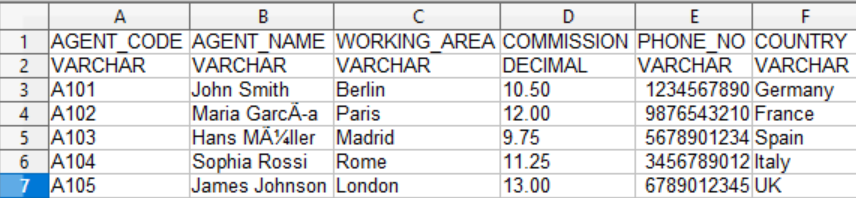
| 1 | Load configuration | Use a properties file containing the JDBC URL, user, SQL statement, export path, and output formats. |
| 2 | Connect to the database | Open a JDBC connection using com.ibm.as400.access.AS400JDBCDriver. |
| 3 | Run SQL | Execute the configured SQL query and receive a ResultSet. |
| 4 | Create a neutral export | Write the ResultSet to XML first. |
| 5 | Transform the result | Use XSLT to generate HTML, JSON, JSONL, CSV, or Markdown. |
2. Context: A Historical Project with Ongoing Learning Value
zeus-access-400 is no longer an actively maintained production tool. The project remains interesting because it demonstrates a clear architectural idea that is still useful today: data is read from IBM i using Java and JDBC, converted into a neutral intermediate structure, and then flexibly transformed into different target formats.
zeus-access-400 is a historical sample project. For new production use, the code should not be adopted unchanged. As a compact example of JDBC access, an XML intermediate format, and XSLT-based output generation, however, it is still very illustrative.Small projects have one major advantage: they reveal the idea without too much framework noise. In this case, the project demonstrates three practical points:
- Java can communicate cleanly with Db2 for i on IBM i via JDBC.
- SQL results can be normalized before being written to concrete output formats.
- XSLT can be a lightweight transformation layer when XML is already part of the pipeline.
3. The Core Idea: Query Once, Export Many Ways
Many data export tasks start with a simple request: “Can I get this as CSV?” Soon after that comes: “Can we also have it as JSON?” Then: “Please generate Markdown for the documentation.” And eventually: “A small HTML view would be useful too.”
The naive solution would be to write custom Java code for every single format. That works at first, but it quickly becomes hard to maintain. zeus-access-400 takes a different route:
This is not the perfect answer for every scenario, but as a pattern it is very useful:
- Data retrieval stays separate from presentation.
- New output formats can be added by introducing additional XSLT files.
- The XML intermediate format can be inspected, tested, versioned, and understood easily.
- The concept works locally, on servers, and in IBM i-related environments.
4. Architecture of the Sample Project
The project is small, which makes it easy to read. It does not follow a modern framework-heavy approach, but instead uses a classic Java CLI structure.
| Component | Role in the Project | Purpose |
|---|---|---|
AppInitializer |
Application entry point. | Loads the properties file, fills the central configuration, and starts the service. |
Config |
Central configuration. | Stores the driver, URL, user, password, SQL query, export paths, and output formats. |
PropertiesLoader |
Configuration loader. | Reads external configuration from a file. |
DatabaseManager |
JDBC helper. | Loads the driver, opens and closes connections, and creates statements. |
DatabaseController |
Orchestration layer. | Coordinates database access, XML export, and format transformation. |
DatabaseService |
Service layer. | Wraps the actual export process from the perspective of the application starter. |
XmlExporter |
XML generation. | Converts a JDBC ResultSet into an XML document. |
XMLtransformer |
XSLT transformation. | Applies XSLT files to the XML and writes the resulting output files. |
5. Data Flow: SQL → ResultSet → XML → Output Format
The actual data flow is simple, which makes it easy to explain.
application.properties
        │
        ▼
JDBC connection to Db2 for i
        │
        ▼
Execute SQL SELECT
        │
        ▼
JDBC ResultSet
        │
        ▼
XML intermediate format
        │
        ├── XSLT → HTML
        ├── XSLT → JSON
        ├── XSLT → JSONL
        ├── XSLT → CSV
        └── XSLT → Markdown
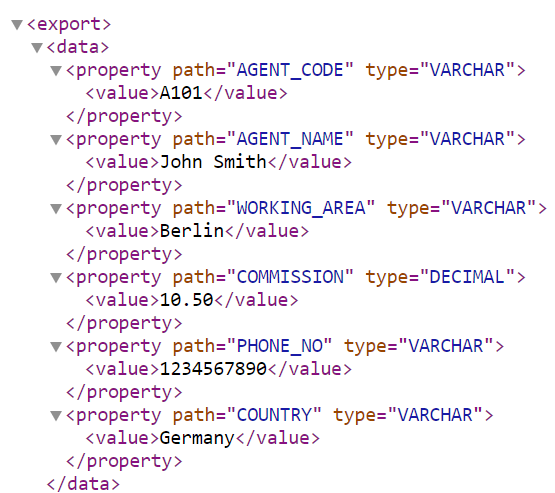
The interesting part is the XML intermediate format. It can contain not only values, but also metadata such as column names and JDBC types. That turns the result into more than just text output — it becomes a structured intermediate representation.
<export>
  <data>
    <property path="CUSTOMER_NO" type="CHAR">
      <value>0004711001</value>
    </property>
    <property path="ORDER_TOTAL" type="DECIMAL">
      <value>1234.56</value>
    </property>
  </data>
</export>
6. Supported Output Formats
The old project demonstrates several target formats. That is exactly what makes it interesting as an example.
| Format | Typical Use | Comment |
|---|---|---|
XML |
Neutral intermediate format, technical post-processing. | Easy to inspect and transform, but quickly becomes verbose with large data sets. |
HTML |
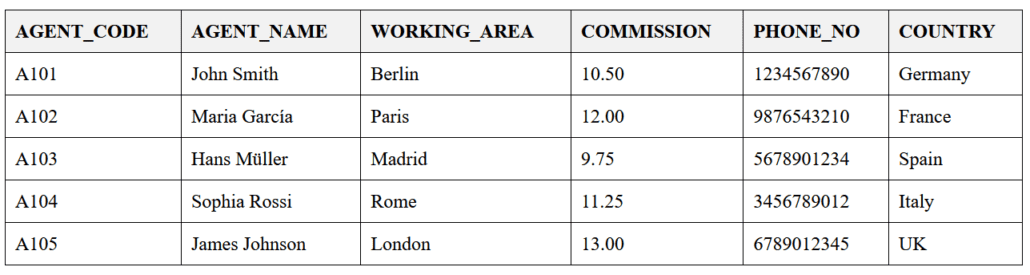
Quick browser view, simple reports. | Useful for business users, QA, or technical documentation. |
JSON |
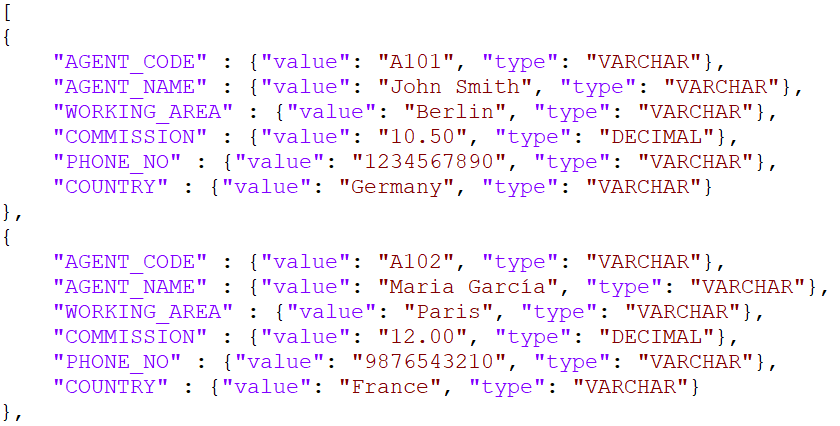
Web applications, APIs, modern integrations. | Good for structured exchange, but type and encoding questions must be handled properly. |
JSONL |
Line-oriented processing, logs, pipelines. | Especially useful when records should be processed one by one. |
CSV |
Excel, BI imports, simple data transfer. | Delimiter, quoting, encoding, and decimal separators should be defined explicitly. |
Markdown |
GitHub/GitLab documentation, technical reports. | A very convenient format for developer-facing documentation. |
7. Configuration and Startup
The historical project uses a simple properties file. For a sample project, that makes the setup easy to understand.
driver=com.ibm.as400.access.AS400JDBCDriver
databaseUrl=jdbc:as400://YOUR_SYSTEM;translate binary=true
username=YOUR_USER
password=YOUR_PASSWORD

xsltpath=./xslt
exportpath=./export

query=SELECT * FROM YOUR_LIB.YOUR_TABLE
exportFormats=html,json,jsonl,csv,md The project is built with Maven:
mvn clean package
Startup on Windows:
java -cp "zeus-access-400-1.0-SNAPSHOT.jar;jt400.jar" de.zeus.hermes.AppInitializer application.properties
Startup on Linux, Unix, or IBM i PASE:
java -cp "zeus-access-400-1.0-SNAPSHOT.jar:jt400.jar" de.zeus.hermes.AppInitializer application.properties
8. Why This Is Especially Interesting on IBM i
IBM i is much more than “an old system with a green-screen interface.” On many systems, highly valuable business data lives directly inside Db2 for i. At the same time, there is often a need to make that data available for modern use cases:
- technical documentation of existing tables and views,
- regular data exports for business departments,
- comparison data for modernization projects,
- JSON or CSV files for external systems,
- Markdown reports for Git repositories,
- HTML views for quick inspection and validation.
That said, an export is not the same thing as modernization. It can prepare, document, or support a modernization effort. The real architecture questions remain: Which data may be read? Who is allowed to see it? How are sensitive fields handled? How is the SQL query validated? And how do we make sure the output formats are technically and functionally correct?
9. Limitations of the Old Approach
The project is intentionally small and direct. That makes it pleasant as a learning example. For production-style use, however, several aspects would need to be handled more rigorously.
| Area | Old Approach | More Sensible Today |
|---|---|---|
| Java version | Java 8 context. | Current LTS version, clear runtime requirements, and automated tests. |
| Credentials | Configuration via properties file. | Environment variables, secret stores, restricted user profiles, and masked logs. |
| SQL execution | The configured query is executed directly. | Read-only guard, only SELECT/WITH, no write operations. |
| Execution safety | Simple CLI startup. | Dry-run by default and explicit --execute for real execution. |
| Traceability | Basic log output. | Run manifest with query, timestamps, output formats, and result files. |
| Large data sets | XML-oriented export. | Streaming, fetch size, memory limits, and targeted formats such as JSONL or CSV. |
| Encoding | Primarily text-based output. | Explicit tests for CCSID, umlauts, special characters, DBCS, and field lengths. |
10. How This Would Be Built More Robustly Today
If this concept were built from scratch today, the direction would be clear: CLI-first, safe by default, traceable execution, deterministic exports, and as little hidden magic as possible.
- Dry-run enabled by default: Without an explicit
--execute, no query is actually run. - Read-only guard: Only read-only SQL statements are allowed.
- Protect secrets: No passwords in logs, manifests, or shell histories.
- Document configuration precedence: CLI overrides environment, environment overrides config, config overrides defaults.
- Make the query source traceable: Clearly identify whether the query came from CLI input, a query file, or a properties value.
- Write a run manifest: Record what was generated, when, and with which output formats.
- Produce deterministic output: Same input, same output — important for tests and diffs.
- Test IBM i-specific edge cases: CCSID, decimal values, date/time fields, leading zeros, and null values.
11. Successor: zeus-ibmi-extract-transform
The modern successor is called zeus-ibmi-extract-transform. It continues the original idea in a more robust direction: read-only SQL extraction from Db2 for i, CLI-first operation, multiple output formats, dry-run by default, and a more complete safety model.
| Aspect | zeus-access-400 | zeus-ibmi-extract-transform |
|---|---|---|
| Status | Historical sample project. | Current successor / modernization path. |
| Goal | Demonstrate JDBC selection and format export. | Controlled read-only extraction from IBM i. |
| Execution | Direct startup with properties. | Dry-run by default, real execution via --execute. |
| Security | Simple sample-level setup. | Read-only guard, secret masking, defined configuration precedence. |
| Formats | XML, HTML, JSON, JSONL, CSV, Markdown via XSLT. | Multi-format export with a more robust CLI and manifest concept. |
| Audit | Logs. | Run manifest for traceability. |
The legacy project remains linked here because it shows the original idea clearly:
zeus-access-400 on GitHub.
For new development, the successor is the better starting point:
zeus-ibmi-extract-transform on GitHub.
12. Conclusion
zeus-access-400 is no longer a modern production tool — but it remains a good example of a strong architectural idea. The project shows, in a compact way, how Java can communicate with IBM i through JDBC, how SQL results can be stored as neutral XML, and how XSLT can turn that XML into several output formats.The real value is not in reusing the old code unchanged. The interesting part is the pattern behind it: separate data retrieval from output generation. That allows one SQL query to become the basis for HTML, JSON, JSONL, CSV, or Markdown.
For today’s IBM i projects, security, configuration, secrets, read-only guards, logging, and large data volumes would need to be handled much more rigorously. The architectural idea, however, remains strong: extract cleanly first, then transform in a controlled way.
Glossary
A short explanation of key terms for anyone moving between Java, JDBC, XML, and IBM i.
- IBM i
- IBM’s modern operating system on Power Systems. It is still often referred to colloquially as AS/400, although that is historically imprecise.
- Db2 for i
- The relational database integrated into IBM i. It can be accessed through traditional IBM i mechanisms as well as through modern SQL and JDBC.
- JDBC
- Java Database Connectivity. A Java API for database connections, SQL execution, and processing result sets.
- JTOpen / IBM Toolbox for Java
- A Java library for integrating with IBM i. It includes the well-known JDBC driver
com.ibm.as400.access.AS400JDBCDriver. - ResultSet
- A JDBC object that provides the result of a SQL query row by row and column by column.
- XML
- A structured text format. In the sample project, XML is used as a neutral intermediate format.
- XSLT
- A transformation language for XML. It can transform XML data into formats such as HTML, text, CSV, or JSON-like output.
- JSONL
- JSON Lines. A line-oriented format where each line contains one JSON object. Useful for pipelines and large data streams.
- Run Manifest
- A log-like file describing a specific run. It documents what was executed, which configuration was used, and which output files were created.
Sources
- Legacy project: zeus-access-400 – https://github.com/gzeuner/RPG4J/tree/main/zeus-access-400
- Successor: zeus-ibmi-extract-transform – https://github.com/gzeuner/zeus-ibmi-extract-transform
- IBM Documentation: AS400JDBCDriver – https://www.ibm.com/docs/en/ssw_ibm_i_74/rzahh/javadoc/com/ibm/as400/access/AS400JDBCDriver.html
- IBM Support: Welcome to IBM Toolbox for Java and JTOpen – https://www.ibm.com/support/pages/welcome-ibm-toolbox-java-and-jtopen
- JTOpen project page – https://ibm.github.io/JTOpen/
- IBM Documentation: Registering the JDBC driver – https://www.ibm.com/docs/en/i/7.4.0?topic=classes-registering-jdbc-driver
- Oracle Java SE 21 API: TransformerFactory – https://docs.oracle.com/en/java/javase/21/docs/api/java.xml/javax/xml/transform/TransformerFactory.html
- Oracle Java SE 21 API: Transformer – https://docs.oracle.com/en/java/javase/21/docs/api/java.xml/javax/xml/transform/Transformer.html
- tiny-tool.de: JDBC – What Is It? – https://tiny-tool.de/jdbc-was-ist-das-eigentlich/
- tiny-tool.de: XSLT in Practice – Transform XML Data Efficiently – https://tiny-tool.de/xslt-in-der-praxis-xml-daten-effizient-transformieren/
CSV - comma separated values
HTML - hypertext narkup language
JSON - javascript object notation
JSONL - javascript object notation lines

XML - extended markup language


 tiny-tool.de